44Net, also called AMPRNet, is the ham radio allocation of IPv4 addresses—named because they all start with 44. Radio amateurs can obtain no-cost leases for publicly routable IP addresses for non-commercial uses. See AMPR's list of permissible services.
The address range was originally allocated in 1981 when there were plenty of IP addresses available. It was requested by Hank Magnuski from Jon Postel, who ran IP allocations before ICANN was created. It was run informally by volunteers until 2011, when ARDC was formed as a nonprofit. ARDC later became a private foundation in 2020, giving out grants for radio-related projects.
Amazon Web Services (AWS) is a cloud hyperscaler with significant technology offerings. One can use 44net IP addresses on AWS, allowing the use of cloud services without the additional cost of obtaining or leasing public IP addresses.
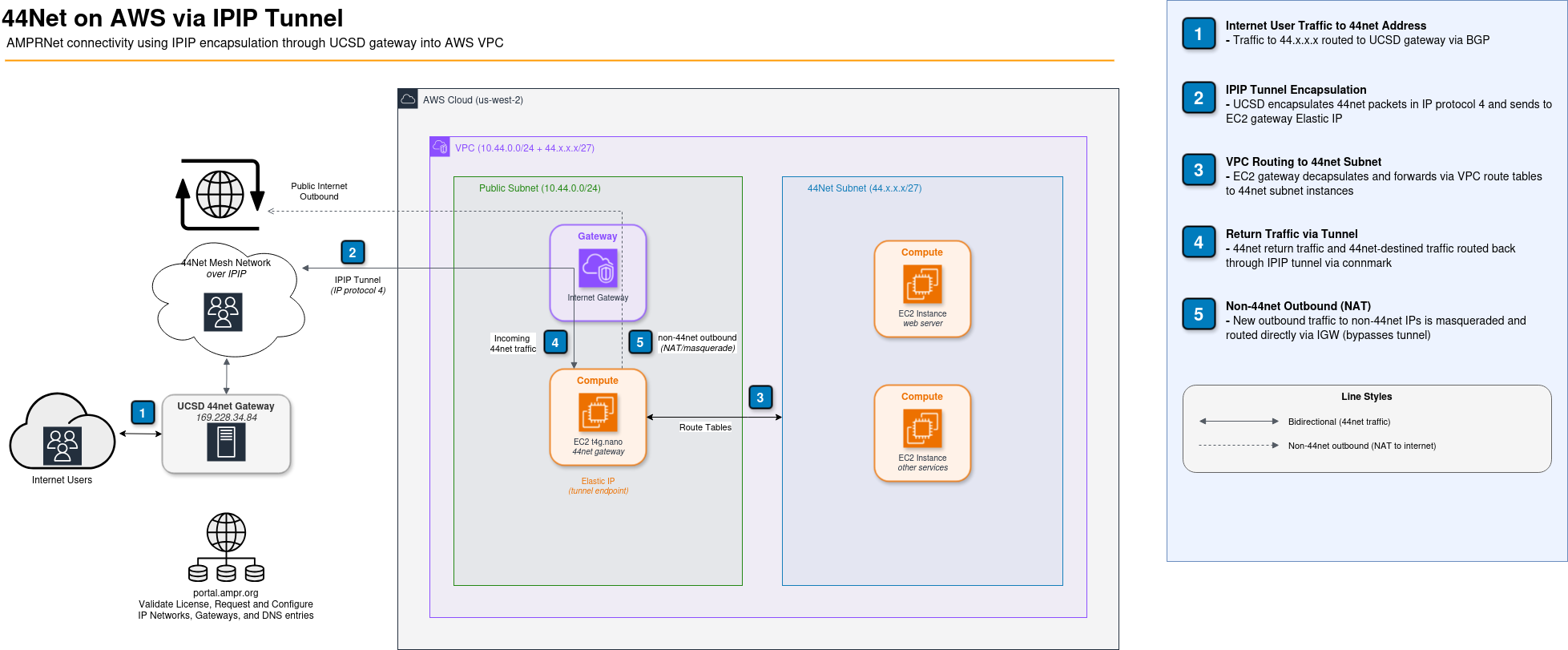
Along with a few other methods (BGP allocation, Wireguard VPN), AMPR's volunteers run a system to provide IP ranges over IP encapsulated tunnels, also called IPIP or IP protocol 4 tunneling. One can join an IPIP mesh network where each node knows how to route specific 44net ranges to other nodes. After requesting an IP range from AMPR, one can join the mesh with an EC2 instance and accept traffic from the mesh into their own AWS VPC.
Connectivity to the larger internet is provided by the University of California San Diego (UCSD). UCSD runs a gateway that serves as the main access point between standard internet routing and the 44net IPIP tunnel mesh network. To minimize unnecessary load on UCSD's 44net gateways, one should route non-44net traffic directly out from AWS instead of via the tunnel. It does require a single public IP to act as the IPIP tunnel endpoint.
The UCSD gateway selectively routes traffic; one needs to assign ampr.org DNS entries to 44net desired destinations for the public internet (see this link).
AMPR also gives the option for radio amateurs who can advertise BGP routes. In this setup, the network is advertised across the internet; this is how the internet learns to route traffic directly over the fastest and highest bandwidth connections. This effectively bakes in one's 44net allocation directly into the fabric of the internet, making it much like any other standard IP range.
While Amazon does have a "Bring Your Own IP" (BYOIP) mechanism for bringing IPs to AWS through BGP advertisement, AWS security requirements for BYOIP means this isn't available for 44net. Like many providers, AWS requires RPKI signatures for such allocations; the RPKI system helps prevent BGP hijacking in which malicious actors spoof false advertising prefixes, allowing those actors to intercept traffic. While the benefits to the internet have been significant, providing RPKI infrastructure is an add-on cost from the Regional Internet Registries (RIR), and AMPR has not chosen to enter such an agreement. Some providers other than AWS do offer BGP advertisement services for AMPR without requiring the additional security layer given by RPKI.
A smaller (t4g.nano) EC2 instance is used as a router/gateway. It requires a public IP from AWS and serves as the endpoint for the tunnel. This gateway routes traffic to the AWS VPC. The VPC has two subnets: a private RFC1918 one such as 10.44.0.0/24, and a 44net one like 44.x.x.x/27. The gateway, along with an AWS Internet Gateway, sits on the RFC1918 network, and standard VPC route tables move traffic between the subnets. The gateway instance is used as the default route for the 44net subnet. It must be configured to allow mismatched source packets as it's delivering packets on behalf of other devices.
Traffic should start flowing via the tunnel within about 5 minutes. Monitor with:
sudo tcpdump proto 4
sudo tcpdump -i ampr0
To set up routing on the AWS side to the 44net subnet:
You can now create EC2 instances, load balancers, or any other VPC-attached services on your 44net subnet. Security groups work as expected. Remember to create a DNS entry on the AMPR portal for every 44net IP you want the UCSD gateway to route from the internet.
The iptables rules in the script do not route all traffic out the tunnel. Return traffic for connections coming in through the tunnel is returned through the tunnel. Traffic destined for other 44net destinations goes through the tunnel. But if an instance initiates traffic to a non-44net destination, it routes directly out through the AWS internet gateway (NAT'd to the gateway EC2 instance). This saves load on the 44net infrastructure and gives faster routes for non-44net traffic (like OS updates).
Put this in /etc/rc.local to run on every boot. It also works as an EC2 user-data startup script (but will only run on first boot in that case).
#!/bin/bash

# Input IP network and first address here. These are provisioned from AMPR.
AMPRNET=<NETWORK CIDR HERE>
AMPRNETGWADDR=<FIRST IP HERE>

# Collect local data from AWS metadata service and system
TOKEN=$(curl -s -X PUT "http://169.254.169.254/latest/api/token" \
  -H "X-aws-ec2-metadata-token-ttl-seconds: 60")
PRIVATE_IP=$(curl -s -H "X-aws-ec2-metadata-token: $TOKEN" \
  http://169.254.169.254/latest/meta-data/local-ipv4)
IFACE=$(ip -o route get 169.254.169.254 | awk '{print $5}')

# Update and install needed packages
apt -y update
apt -y install ampr-ripd net-tools

# Make the directory for ampr-ripd to store its cache
mkdir -p /var/lib/ampr-ripd

# Set up tunnel
ip tunnel add ampr0 mode ipip local $PRIVATE_IP ttl 225
ip link set dev ampr0 up
ip link set ampr0 multicast on
# Assign 44net address to tunnel (makes gw accessible on 44net)
# Use $PRIVATE_IP instead if you don't want the gw on 44net
ip addr add $AMPRNETGWADDR/32 dev ampr0
# Note: an addr is required for the mangle table to work.
# If mangle isn't needed, the addr is optional.

# Set up routing over tunnel
ip rule add to 44.0.0.0/9 table 44 priority 44
ip rule add to 44.128.0.0/10 table 44 priority 44
# Default to UCSD gateway. ampr-ripd will populate the rest.
ip route add default dev ampr0 via 169.228.34.84 onlink table 44

# Firewall rules for the tunnel interface
# Traffic exiting the tunnel does NOT go through AWS security groups
iptables -A INPUT ! -i ampr0 -j ACCEPT
iptables -A INPUT -i ampr0 -p udp --dport 520 -j ACCEPT
iptables -A INPUT -i ampr0 -m state --state ESTABLISHED,RELATED -j ACCEPT
iptables -A INPUT -i ampr0 -p igmp -j ACCEPT
iptables -A INPUT -i ampr0 -p icmp -j ACCEPT
# Uncomment to open ports on the gateway itself:
#iptables -A INPUT -i ampr0 -p tcp --dport 22 -j ACCEPT
#iptables -A INPUT -i ampr0 -p tcp --dport 80 -j ACCEPT
#iptables -A INPUT -i ampr0 -p tcp --dport 443 -j ACCEPT
iptables -A INPUT -i ampr0 -j DROP

# Set up forwarding
# Once forwarded to VPC, AWS security groups take over
iptables -P FORWARD DROP
iptables -A FORWARD -s $AMPRNET -j ACCEPT
iptables -A FORWARD -d $AMPRNET -j ACCEPT
sysctl -w net.ipv4.ip_forward=1
# IMPORTANT: must come before 44.0.0.0/9 rules to prevent loops
ip rule add to $AMPRNET lookup main priority 35

# Mark tunnel traffic for return routing
# New traffic to non-44net destinations gets NAT'd out directly
iptables -t mangle -A PREROUTING ! -i ampr0 -m connmark --mark 45 -j CONNMARK --restore-mark
iptables -t mangle -A PREROUTING -i ampr0 -s 44.0.0.0/9   -j RETURN
iptables -t mangle -A PREROUTING -i ampr0 -s 44.128.0.0/10 -j RETURN
iptables -t mangle -A PREROUTING -i ampr0 -j CONNMARK --set-mark 45
iptables -t mangle -A OUTPUT -m connmark --mark 45 -j CONNMARK --restore-mark
iptables -t nat -A POSTROUTING -o $IFACE -s $AMPRNET -j MASQUERADE
ip rule add fwmark 45 table 44 priority 100

# Start the AMPR RIP daemon
# First run: use -d flag to discover the password
# ampr-ripd will background itself without -d
ampr-ripd -s -i ampr0 -a $AMPRNET -t 44 -p <password-here>